 Cloud Cover
Rain to the minute. No ads.
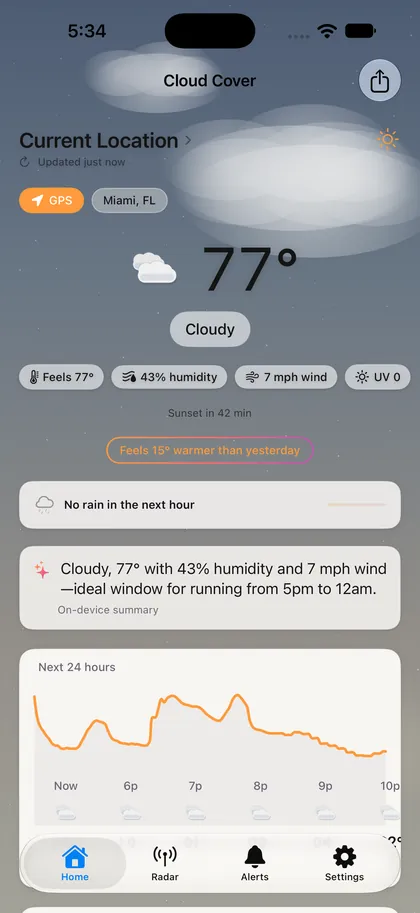
Minute-by-minute rain you can feel under your thumb, over a sky drawn from the real position of the sun and moon. Built by one person, with no accounts and nothing to track you.
Free to download. iPhone only. Pro from $19.99/year with a 7-day free trial.
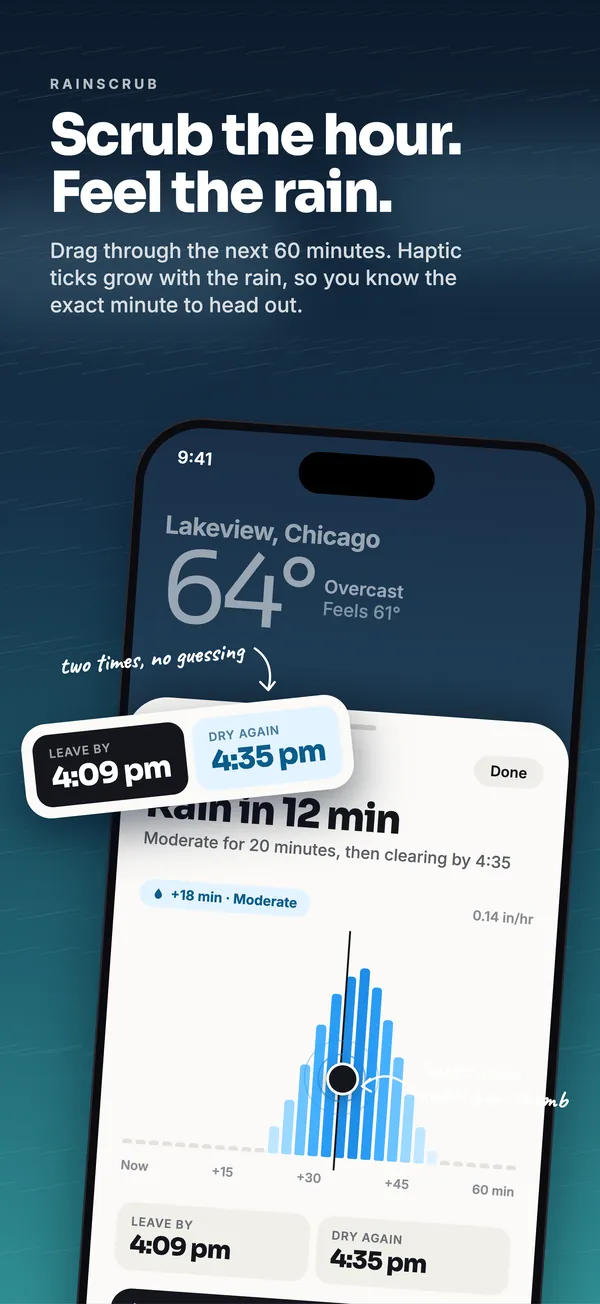
Feel the rain before it falls.
Drag through the next 60 minutes. Haptic ticks get sharper as the rain gets heavier, so you know the exact minute to head out and the exact minute it clears.
- Minute by minute, next hour. Not “40% chance today.” When, how hard, and for how long.
- Haptics that match intensity. Light drizzle taps softly. A downpour hits harder. You can read the timeline without looking.
- Free for your current location. Pro adds it to every location you save.
- Rain-starting-soon alerts. A heads-up before the first drop. iOS limits background work, so an alert can occasionally arrive late; we say so in the app rather than pretend otherwise.
A sky that matches the sky.
The background isn’t a stock photo. It’s computed from where the sun and moon actually are above you right now, then layered with whatever the weather is doing.
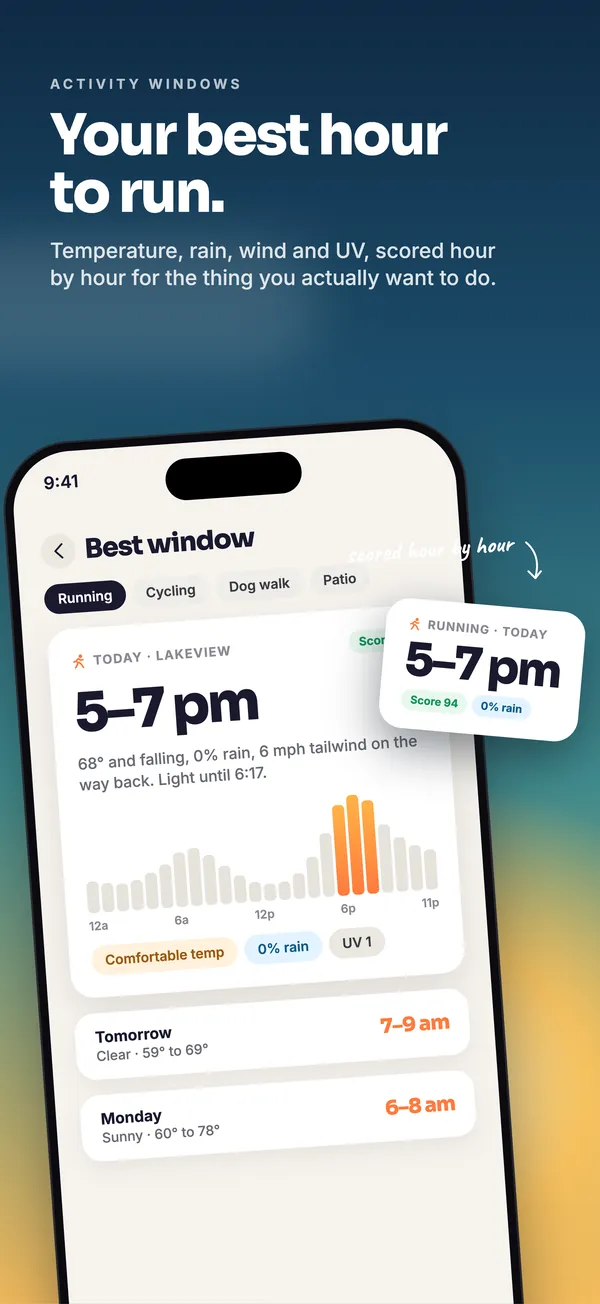
Your best hour to be outside.
Pick the thing you want to do. Cloud Cover scores the next 48 hours by temperature, rain, wind, and UV, and tells you the best window, with the reasons.
- Running, cycling, dog walks, outdoor work, taking the kids out. Each one is scored differently, because a good hour for a run is not a good hour for a toddler.
- Reasons, not just a score. “68° and falling, 0% rain, light until 6:17.”
- Two days ahead. See tomorrow’s and the next day’s windows so you can plan around them.
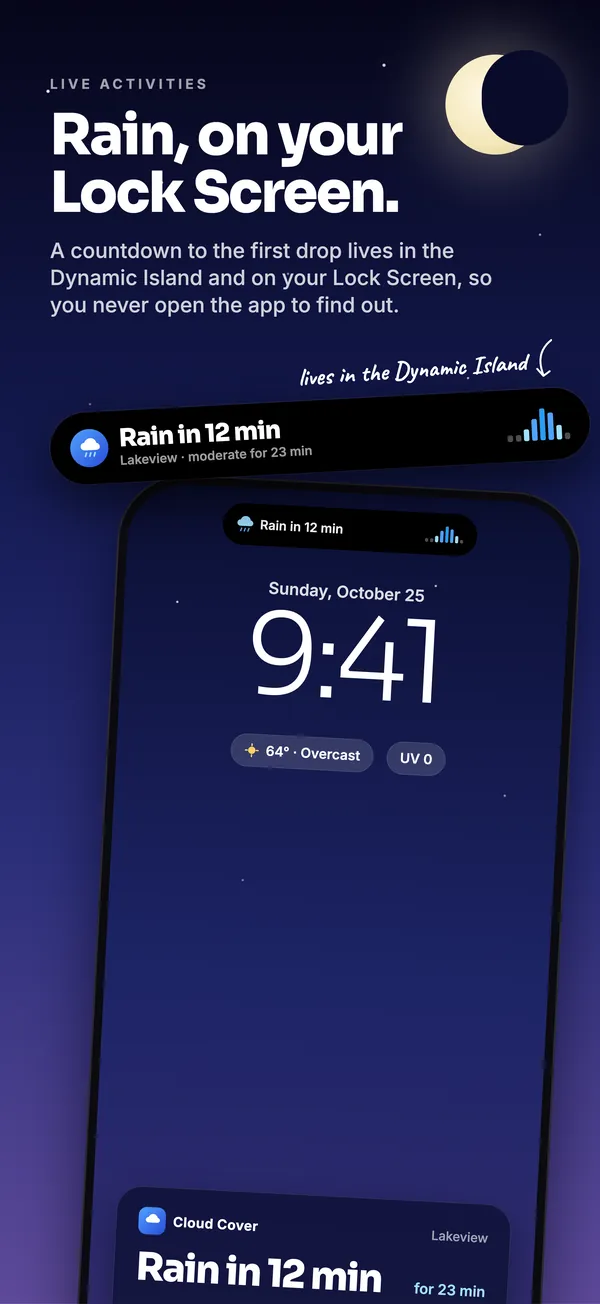
Rain, on your Lock Screen.
When rain is approaching, start a Live Activity from Home with one tap. The countdown to the first drop lives in the Dynamic Island and on your Lock Screen, so you never have to open the app to find out.
- One tap to start. You decide when it’s worth watching.
- Glanceable. Minutes until rain, how heavy, how long.
- Widgets too. Home Screen and Lock Screen widgets for the days you’d rather not open anything.
See it coming. Hear about it first.
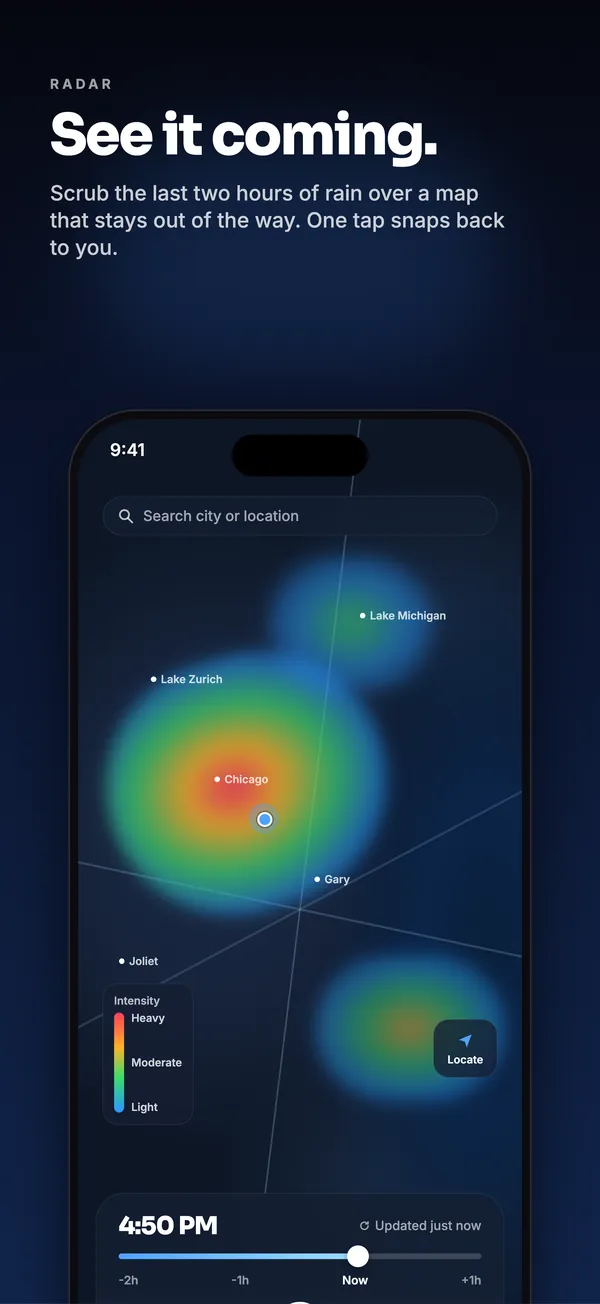
Animated precipitation radar with a timeline you can scrub, on a map that stays out of the way. And government severe weather alerts that are free for everyone, because safety isn’t an upsell.
- Scrubbable radar. Drag back through recent frames to see where the rain has been heading.
- NOAA / National Weather Service alerts. Watches, warnings, and advisories from the official source, on every tier, including Free.
- One tap snaps back to you. Wander the map, then jump home.
We don’t know who you are. We like it that way.
No accounts. No ads. No third-party analytics. Your location is rounded to about 1 km before any forecast request leaves your phone.
Honest pricing. No ads on any tier.
The free app is a real weather app, not a demo. Pro is for people who want the minute-rain tools on more than one place.
Free
$0
Forever. No ads.
- RainScrub minute rain for your current location
- Live sky with real sun, moon, and moon phases
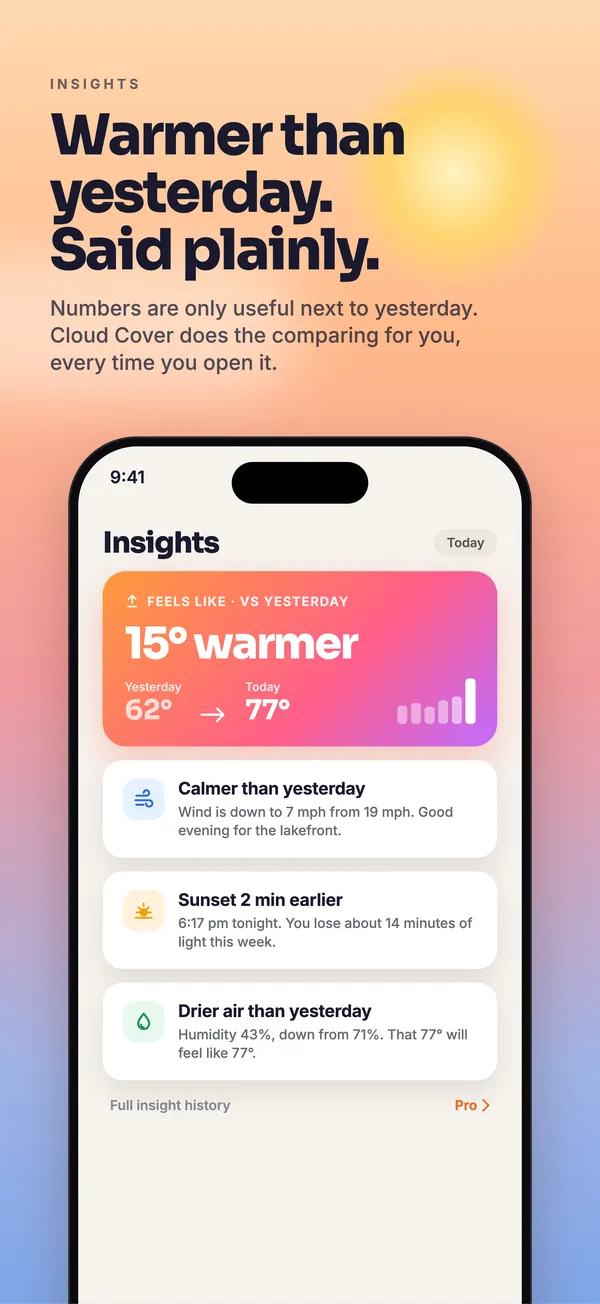
- Better-than-yesterday comparison
- NOAA / NWS severe weather alerts
- Animated radar with scrubbable timeline
- Hourly and daily forecast
Cloud Cover Pro
$19.99/year
or $2.99/month · about $1.67/month on annual
- Everything in Free
- Unlimited saved locations
- RainScrub on any location
- Rain-starting-soon alerts for every location
- Activity Windows for every saved spot
- All widget sizes, Lock Screen, and Live Activities
7 days free, then $19.99/year or $2.99/month. Auto-renews until cancelled. Cancel anytime in your Apple Account settings.
Family
$34.99/year
Up to 6 people via Family Sharing
- Everything in Pro
- Shared with your Apple Family Sharing group
- Each person keeps their own locations and settings
Billed yearly. Auto-renews until cancelled. Cancel anytime in your Apple Account settings.
Questions, answered plainly.
Why is Pro a subscription instead of a one-time purchase?
Every forecast you see costs money to fetch from the weather provider, every month, for as long as you use the app. A subscription keeps that honest: you pay a little while you use it, and the app keeps running without ads or selling anything about you. If you only need your current location, the free tier has no time limit.
What’s free, exactly?
Minute-by-minute RainScrub for your current location, the live sky, the better-than-yesterday comparison, NOAA/NWS severe weather alerts, animated radar, and the hourly and daily forecast. Pro adds unlimited saved locations with RainScrub, rain alerts, and Activity Windows on each, plus all widget sizes, Lock Screen widgets, and Live Activities.
Does it work offline?
Cloud Cover shows the last forecast it fetched when you have no connection, with the time it was updated. New forecasts, radar frames, and alerts need a connection. The live sky’s sun and moon position are computed on your phone and keep working regardless.
Is my location sold or shared?
No. There are no accounts, no ad SDKs, and no third-party analytics in the app. Before any forecast request leaves your phone, your location is rounded to about a 1 km tile, so the weather service never receives your exact coordinates. Details are in the privacy policy.
How does the Family plan work?
Family is $34.99/year and uses Apple’s Family Sharing. One person in your Family Sharing group subscribes, and up to six members get Pro on their own devices with their own locations and settings. You manage it in your Apple Account like any other subscription.
Why might a rain alert arrive late?
iOS tightly limits how often an app can wake up in the background to save your battery, and the app can’t override that. Cloud Cover checks as often as iOS allows, so most alerts land in time, but an alert can occasionally be delayed. If rain is on the way and you want to watch it closely, start a Live Activity from the Home screen.
How do I cancel?
Open the Settings app on your iPhone, tap your name, tap Subscriptions, choose Cloud Cover, and tap Cancel. You keep Pro until the end of the period you’ve already paid for. You can also reach the same screen from inside the App Store app.
Where does the data come from?
Weather data comes from Tomorrow.io. Radar imagery comes from RainViewer. Severe weather alerts come from the NOAA National Weather Service. The sun and moon positions and moon phases are calculated on your device.
Need a hand?
Cloud Cover is built and supported by one person. Email and you’ll get a real reply.